

Protocol Overview
The Unified Pilot Protocol (UPP) uses JSON messages over WebSocket. All messages follow a standard structure with protocol versioning and message correlation.Connection Details
- Protocol: WebSocket (ws://)
- Host:
<qaptly_desktop_ip>(local network IP) - Port: 18765
- Path: /upp
- Full URL:
ws://<qaptly_desktop_ip>:18765/upp
Network Configuration:
<qaptly_desktop_ip> represents the IP address of the machine running Qaptly Desktop on your local network (e.g., 192.168.1.100, 10.0.0.5).⚠️ Internal Network Only: UPP is designed for local network deployments. Do not expose the WebSocket server to the public internet.Protocol Version
Current version: 1.0.0 (semantic versioning) All messages must includeprotocolVersion: "1.0.0" for compatibility checking.
Base Message Structure
Every UPP message follows this format:Message Types
Register Message
Pilot sends this message immediately after connecting. Direction: Pilot → QaptlyFirst-Time Connection (No Key)
Reconnection (With Key)
Pilot Info Fields
Auth Fields
Capability Fields
Register Response
Qaptly sends this after processing registration. Direction: Qaptly → PilotSuccess (Known Pilot)
Pending Approval (New Pilot)
Approved (With Key)
Failure
Error Codes
Command Message
Qaptly sends commands to execute actions. Direction: Qaptly → PilotFields
Response Message
Pilot responds with execution results. Direction: Pilot → QaptlySuccess
Failure
Fields
Event Message
Pilot sends events for subscribed listeners. Direction: Pilot → QaptlyImportant: Only send events that Qaptly has subscribed to. Unsubscribed events are ignored.
Subscribe Message
Qaptly subscribes to specific events. Direction: Qaptly → PilotSubscribe to Events
Unsubscribe from Events
Wildcard Support
- Subscribe to all events:
["*"] - Subscribe to domain:
["wifi.*"](all wifi events)
Heartbeat Message
Keep connection alive. Both parties send this every 30 seconds. Direction: BidirectionalHeartbeat Policy
Action Naming Convention
Actions use the format:domain.action
Standard Domains
Custom Domains
Use vendor prefix for custom domains:acme.motor.rotateacme.motor.stopmycompany.led.set_color
Connection Lifecycle
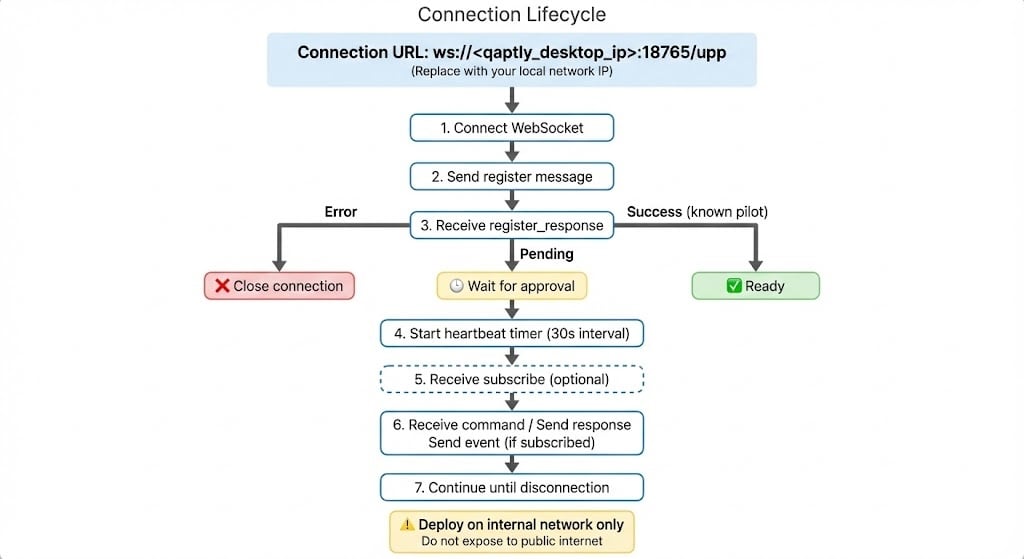
Disconnection
- Clean disconnect: Close WebSocket normally
- Timeout: No message for 90 seconds
- Grace period: 5 minutes to reconnect with same key
Best Practices
Message IDs
Use UUID v4 for all message IDs:Timestamps
Use ISO 8601 format with ‘Z’ suffix (UTC):Error Handling
Always include meaningful error codes and messages:Event Filtering
Only send events that Qaptly subscribed to:Next Steps
Authentication
Security model and key management
Capabilities
Define capabilities with JSON Schema
Examples
Complete working implementations
Quick Start
Build your first pilot