

What are Custom Pilots?
Custom Pilots are third-party extensions that connect to Qaptly Desktop to provide additional automation capabilities. Using the Unified Pilot Protocol (UPP), you can create pilots that:- Control WiFi networks (scan, connect, disconnect)
- Manage IoT devices (smart home, sensors)
- Interact with hardware (GPIO, serial ports)
- Execute custom commands on remote devices
- Send real-time event notifications
Use Cases
Network Testing
Build a Raspberry Pi-based WiFi controller to test your app’s behavior under different network conditions:- Switch between WiFi networks during test execution
- Simulate network disconnections
- Monitor signal strength and latency
IoT Automation
Control IoT devices as part of your test scenarios:- Smart lights, thermostats, door locks
- Sensors for temperature, humidity, motion
- Custom hardware integrations
Remote Command Execution
Execute commands on remote devices:- Run scripts on embedded systems
- Control test equipment
- Manage test infrastructure
How It Works
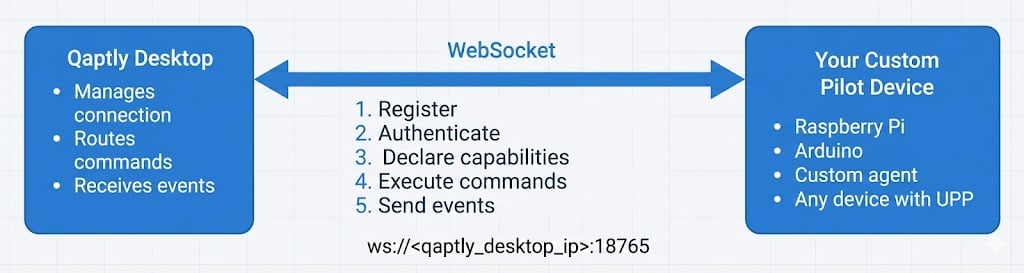
Network Deployment:
<qaptly_desktop_ip> is the local network IP address of the machine running Qaptly Desktop (e.g., 192.168.1.100).⚠️ Security: UPP is designed for internal network use only. Do not expose to the public internet.Key Features
Self-Describing
Your pilot declares its own capabilities using JSON Schema. Qaptly dynamically discovers what actions your pilot supports.Secure by Default
- First-time connection requires user approval
- Pre-shared keys for authentication
- Internal network deployment (not exposed to public internet)
Real-Time Events
Your pilot can send events to notify Qaptly about state changes:wifi.connected- WiFi connection establishedsensor.temperature_changed- Temperature reading updated- Custom events specific to your use case
Language Agnostic
Implement your pilot in any language that supports:- WebSocket client
- JSON serialization
- Your platform (Python, Node.js, Go, Rust, C++, etc.)
Architecture
UPP is separate from Qaptly’s internal pilots (Android, iOS, macOS automation). Your custom pilots:- ✅ Run independently
- ✅ Connect via WebSocket
- ✅ Declare their own capabilities
- ✅ Don’t interfere with internal pilots
Protocol Basics
Message Format
All messages use JSON with UTF-8 encoding:Connection Flow
- Connect - Your pilot connects via WebSocket
- Register - Send pilot info and capabilities
- Authenticate - User approves (first time) or key is verified
- Execute - Qaptly sends commands, your pilot responds
- Events - Your pilot sends real-time events (optional)
- Heartbeat - Keep connection alive (every 30 seconds)
Getting Started
Ready to build your first custom pilot?Quick Start
Build a simple WiFi controller in 15 minutes
Protocol Reference
Complete protocol specification
Authentication
Security and key management
Examples
Complete working examples
Requirements
To develop a custom pilot, you need:- Development Environment: Any language with WebSocket support
- Qaptly Desktop: Version 0.15.0 or later
- Target Device (optional): Raspberry Pi, Arduino, or any networked device
Next Steps
- Follow the Quick Start Guide to build your first pilot
- Read the Protocol Reference for detailed specifications
- Check out Examples for complete implementations